Here’s a slightly uncomfortable truth about shelf edge displays: if all you’re showing is the price, you’re leaving most of the value on the table. The price is table stakes. It’s what the shelf edge has always done, whether printed on paper or rendered on an e-paper label. The interesting question — and the one more retailers are asking — is what else belongs on that tiny sliver of screen real estate.
The answer is turning out to be surprisingly rich. ESLs and shelf edge displays are evolving from pricing tools into dynamic communication platforms that can carry product stories, sustainability credentials, preparation ideas, and context-specific prompts at the exact moment a shopper’s hand is hovering near the shelf. Get the shelf display content right, and you’re not just informing a purchase decision. You’re shaping it.
This piece walks through a practical content strategy: what to show, how to match content to the screen you’ve actually got, and how to keep the whole thing from becoming digital clutter.
Start with the Job the Shopper Is Doing
Before brainstorming digital shelf content ideas, it helps to anchor on a simple principle: shelf edge content should do one of three jobs. It should reduce friction (help someone decide faster), build trust (give them a reason to believe), or create a nudge (make a relevant option more visible). Content that does none of these is just noise on a screen.
With that filter in mind, here’s what’s actually earning its place at the shelf edge.
Trust and values: the content shoppers actively look for
Shoppers increasingly want to know what’s in a product, where it came from, and whether it aligns with how they try to shop. Shelf edge displays are uniquely positioned to answer those questions at the point of decision.
East of England Co-op’s pilot with Pricer Avenue is a useful reference point. The platform uses a “Floating Canvas” that connects multiple ESLs into a larger cohesive display, and the retailer uses it to surface nutritional highlights alongside “Local Producer” stories — turning the shelf edge from a price tag into what the retailer calls a “dynamic information hub”. Shoppers get the “who” and “where” behind a product without pulling out a phone or hunting for a QR code.
Allergen information is another high-value play. Asda’s ESL rollout includes QR codes at the shelf edge specifically for allergen data, layered on top of the standard cost, weight, and unit price. For shoppers with dietary restrictions, that’s not a nice-to-have. It’s the difference between confidence and a lengthy label-reading session.
Sustainability metrics are moving in the same direction. Partnerships like the one between VusionGroup and HowGood have pushed climate labeling and environmental scores onto digital shelf displays across large product catalogs. The content strategy question isn’t whether shoppers care — it’s how much of that information can be absorbed at a glance. A simple visual score works. A paragraph of carbon accounting does not.
Story and origin: the content that builds preference
Price tells someone what a product costs. Origin and story tell them why it might be worth it.
This is where shelf edge displays start doing something closer to brand-building. A local cheese with a three-line note about the farm it came from. A coffee with a short roast profile. A product with a “new here” flag that gives a curious shopper permission to try something unfamiliar. The shelf edge is the last touchpoint before the basket, and story-led content at that moment has a disproportionate influence.
The data backs up the potential. Research on in-store media has found that 77% of shoppers add unplanned items to their basket after encountering in-store media, and 79% remain open to considering new brands at the shelf. Story-driven shelf content doesn’t have to compete with the price. It sits alongside it, giving the shopper a second reason to pick something up.
Utility and help: recipes, pairings, and preparation
Some of the most practical digital shelf content ideas are almost aggressively unglamorous. How do you cook this? What goes with it? What’s a realistic serving size?
Recipe suggestions and pairing prompts are a natural fit for grocery shelf edges, especially in fresh and meal-solution categories. The Pricer team explicitly lists recipe suggestions and origin information among the content types ESLs can carry beyond price. A shopper standing in front of a cut of meat or a vegetable they don’t usually buy is precisely the person who benefits from a one-line preparation cue.
QR codes extend this without overloading the screen. A compact label can show the price, a short benefit line, and a code that leads to a full recipe, a how-to video, or a shade-matching tool in beauty retail. The shelf edge handles the nudge; the phone handles the depth. That division of labour keeps the display readable and the content scalable.
Context and timing: content that changes with the moment
Static content is fine. Content that changes with the situation is better.
Because shelf edge displays are connected, they can carry time-sensitive messages without anyone printing or replacing anything. A promotional flag that activates automatically on a scheduled date. A “last few days” note as a promotion nears its end. A weather-relevant prompt in a category where weather actually moves demand. A local event tie-in that only appears in stores near the venue.
The East of England Co-op pilot reported that promotional feature bays were identified 43% faster by shoppers, and pilot stores saw sales uplifts of up to 2.2% — evidence that well-timed, well-placed shelf content can shift behaviour, not just inform it. The content didn’t replace the price. It gave the promotion a reason to be noticed.
Match the Content to the Screen You Actually Have
Here’s where strategy meets physics. Not every
shelf edge display can carry every type of content. The shelf display content plan has to respect the hardware.
E-paper ESLs are the workhorses. They’re bistable, meaning the image stays on screen without power, and a coin-cell battery can last five to ten years with infrequent refreshes. That makes them brilliant for price, unit price, a short origin line, a static sustainability score, or a QR code. They are not built for video, animation, or rapid content rotation. If your content plan assumes motion, e-paper will disappoint.
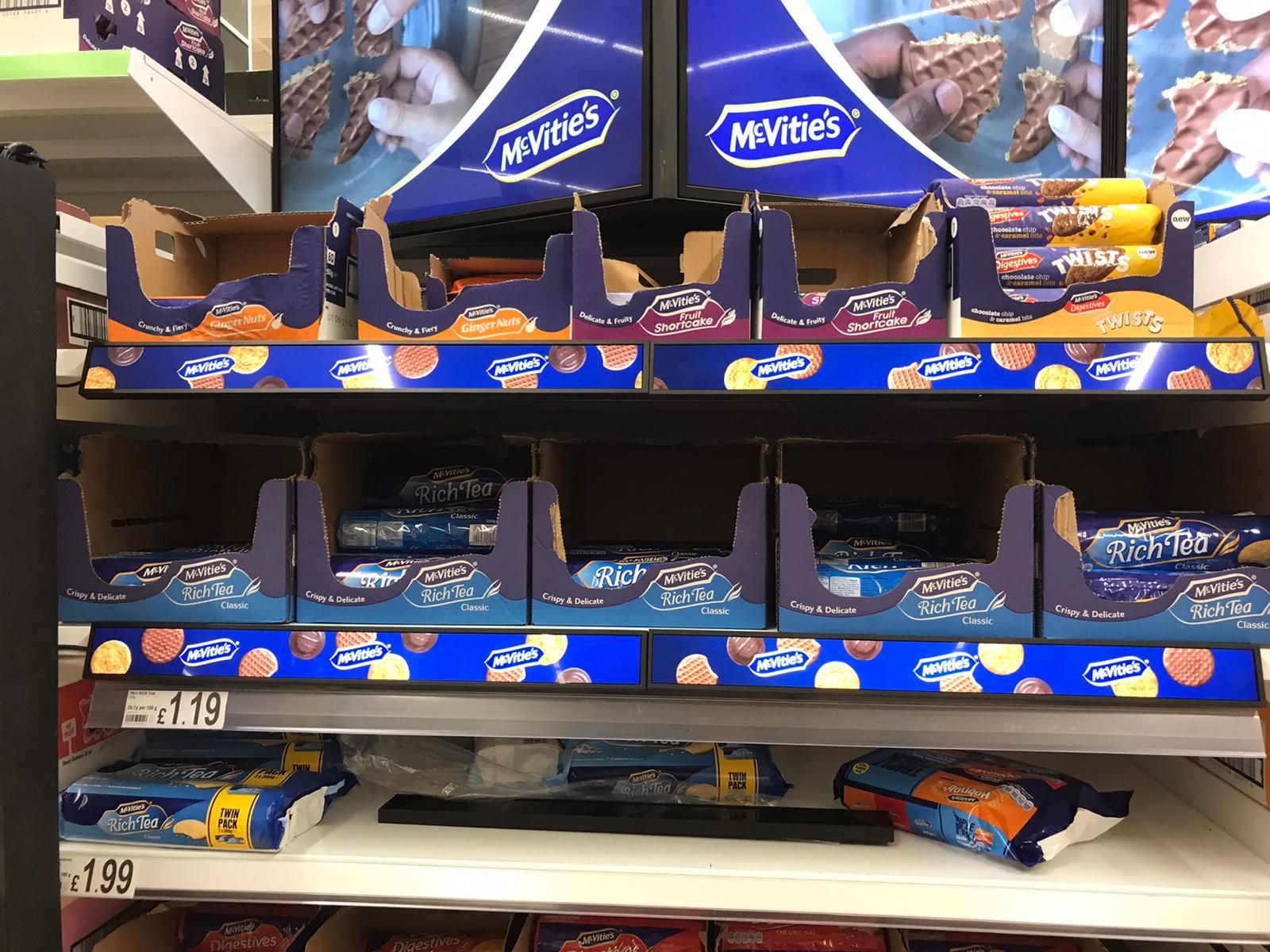
Graphic LCD ESLs sit at the other end. They require permanent power and network connectivity, but they support full-colour graphics, video, animation, and even touch interaction through capacitive touchscreens and integrated sensors. That opens the door to richer content — a looping recipe video, an interactive shade finder, a “find this in store” prompt — but only where the power and infrastructure exist to support it.
The practical content strategy is therefore tiered. Use e-paper ESLs for the high-volume, always-on facts: price, unit price, origin, allergen QR, sustainability badge. Reserve LCD shelf edge displays for high-value zones where richer storytelling or interaction earns its keep — promotional bays, new product launches, beauty and electronics categories where the decision is more considered.
The Rhythm Question: How Often Should Content Change?
There’s a temptation, once displays are connected, to change content constantly. Resist it.
Shoppers don’t spend long at the shelf. One study of digital shelf banners found an average contact time of around seven seconds per interaction. Seven seconds is not enough time to absorb a rotating carousel of messages. It’s enough time to register a price, a short claim, and maybe one supporting line.
A better rhythm is event-driven rather than time-driven. Content changes when something meaningful changes: a promotion starts or ends, stock position shifts, a product moves from “new” to “established,” or a local relevance window opens. In between those events, the display stays stable. E-paper handles this naturally. LCD displays can rotate a small number of frames, but the rotation should serve a single message, not audition five different ones in the hope that one lands.
The content frequency should also match the operational reality. If nobody owns the content calendar, the shelf edge fills with whatever was loaded at launch. A simple rule — one promotional slot, one evergreen trust or utility slot, one QR-based depth slot — keeps the display purposeful without requiring a content team to feed it daily.
Measure What the Shelf Is Actually Doing
The final piece of the strategy is measurement. Shelf edge content is not above scrutiny just because it’s digital.
At the most basic level, track whether content is accurate and current. Price mismatches, expired promotions, and dead QR codes erode trust faster than a blank screen. Beyond accuracy, look at the behaviours the content is meant to influence: lift on featured items during content-active periods, QR scan rates where a code is present, and sell-through on products carrying story or origin content versus matched controls without it.
The East of England Co-op result — promotional bays found 43% faster, up to 2.2% sales uplift — is the kind of outcome worth designing toward. It wasn’t achieved by filling the shelf with more text. It was achieved by putting the right content in front of the shopper at the right moment, in a format the hardware could actually deliver cleanly.
The Bottom Line
The price will always be the anchor of the shelf edge. But the displays that are now being deployed across stores are capable of so much more than a number. The retailers getting value from shelf display integration and ESL platforms are treating the shelf edge as a communication channel with a job to do: reduce friction, build trust, and nudge the right shopper toward the right product.
That doesn’t require a content studio or a daily publishing operation. It requires choosing a small number of content types that match the screen, the category, and the moment — and then letting the price do its job while everything else earns its place beside it.



Leave A Comment