
Let’s cut through the noise: content is the heartbeat of digital signage. No matter how advanced your hardware is, how strategically you’ve placed your screens, or how much you’ve invested in analytics, if your content isn’t resonating with your audience, your signage is just a fancy screen in the background.
The good news? You don’t need a marketing degree or a team of designers to create engaging content. What you do need is a clear strategy that aligns with your audience, environment, and goals. Here are 10 actionable tips to transform your digital signage from a static display into a dynamic tool for engagement.
1. Know Your Audience (And Tailor Content to Them)
Your content isn’t a one-size-fits-all solution. A luxury car ad in a budget retail store? A kids’ toy promotion in a senior center? A tech product demo in a location with no tech-savvy customers? These mismatches are a guaranteed recipe for irrelevance.
Solution: Use demographic data (age, gender, income level) and behavioral insights (time of day, foot traffic patterns) to tailor your content. If your signage is in a coffee shop, focus on morning specials, seasonal drinks, or local events. If it’s in a hospital, prioritize health tips, wayfinding, or emergency alerts.
2. Simplify—Less Is More
People don’t have time to decode your content. A cluttered screen with 10 messages, 5 fonts, and 3 colors is a guaranteed turn-off.
Solution: Focus on one clear message per screen. Use high-contrast visuals, bold text, and minimalistic layouts. For example:
A restaurant menu board showing a single “Today’s Special” with a photo and price.
A retail display highlighting one product with a QR code for more details.
A transit station screen showing a single departure time with a countdown timer.
Pro tip: Use the rule of thirds in design—divide your screen into three sections and focus on one element per section.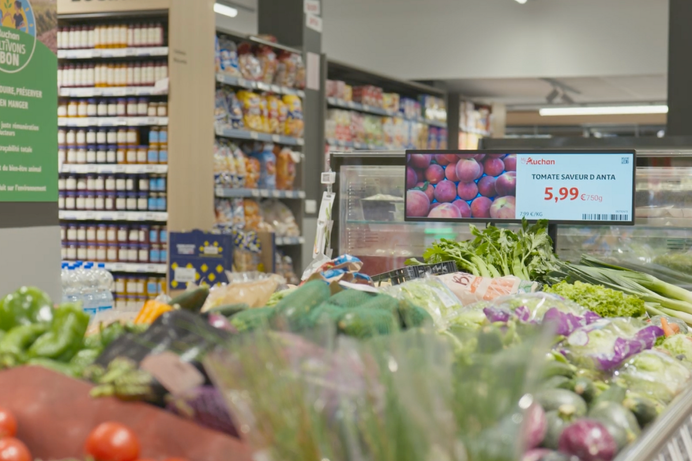
3. Make It Interactive (Even Slightly)
Static content is like a billboard in a world of TikTok. People won’t stop to watch unless they’re compelled to engage.
Solution: Add minimal interactivity without overcomplicating things.
Use touchscreens for product details or promotions.
Add QR codes that lead to mobile experiences (e.g., a “Scan for a discount” or “Scan to see our latest collection”).
Use motion sensors to trigger content when someone is near (e.g., a “Welcome” message or a product demo).
Even simple additions like countdown timers or live social media feeds can make your content feel alive.
4. Avoid Overloading With Information
In the quest to be “engaging,” many signage owners go too far. Displays that show 10 products, 5 promotions, and 3 videos in rapid succession overwhelm viewers.
Solution: Prioritize clarity over quantity.
Use white space to let your message breathe.
Focus on one core message per screen.
Use animations or transitions sparingly—too much motion distracts, too little makes it feel stale.
Example: A retail display showing a single product with a tagline (“New Arrival: 30% Off!”), a photo, and a call-to-action (“Scan the code to shop now”) is far more effective than a screen showing 5 products with flashing lights and auto-rotating slides.
5. Measure Engagement (And Use the Data)
If you don’t know who’s seeing your content, how long they’re looking at it, or what they’re reacting to, you’re flying blind.
Solution: Implement viewer analytics tools.
Use heatmaps to see where people are looking.
Track dwell time (how long viewers engage with your content).
Use A/B testing to compare content variations (e.g., “Special 1” vs. “Special 2”).
Pro tip: Start with free tools like Google Analytics or built-in CMS analytics before investing in enterprise-grade solutions.
6. Upgrade Your Tech (If Needed)
Outdated hardware can’t handle high-resolution content, interactive features, or real-time updates. A 2015-era display trying to run a 4K video or a touchscreen app is a guaranteed fail.
Solution: Ensure your displays support dynamic content and real-time updates. Use a content management system (CMS) that allows scheduling, A/B testing, and analytics integration.
Example: If you’re running a retail promotion, ensure your CMS can update prices instantly and your display can handle high-contrast visuals.
7. Align Content With the Environment
Your signage might be ignored because it’s competing with other distractions. In a busy mall, it’s lost among product shelves. In an office building, it’s drowned out by other screens.
Solution: Differentiate your content.
Use high-contrast visuals (e.g., bright colors on dark backgrounds).
Use motion or animation to draw attention.
Use sound (e.g., a chime when a new promotion starts).
Example: A restaurant display showing a rotating menu with subtle animations will stand out more than a static image of the same menu.
8. Maintain Content Regularly
Even the best content becomes irrelevant if it’s not updated. A display showing “Spring Sale” in July is a guaranteed disconnect.
Solution: Create a content maintenance schedule.
Review content monthly for accuracy and relevance.
Update based on viewer feedback (e.g., if a promotion isn’t performing, swap it out).
Use a CMS that makes updates easy (e.g., drag-and-drop interfaces or pre-designed templates).
Pro tip: Set reminders in your calendar to review content quarterly.
9. Add Clear Calls to Action
If your signage doesn’t tell viewers what to do next, they’ll walk away. A display showing a promotion without a “Scan the code to shop now” is just a pretty picture.
Solution: Use clear calls to action (CTAs).
Use directional arrows or text like “Scan here,” “Click to learn more,” or “Visit our store.”
Ensure your CTAs are visually distinct (e.g., a red button for “Shop Now” or a QR code with a border).
Example: A retail display showing a product with a QR code and the text “Scan to save 20%” is far more effective than a screen showing the same product with no instructions.
10. Test, Learn, and Iterate
Your first content strategy might not hit the mark. That’s okay—digital signage is a process of trial and error.
Solution:
Run A/B tests for different content variations.
Use analytics to identify what works (e.g., which promotions drive the most scans).
Iterate based on feedback (e.g., if a product demo isn’t engaging, simplify it).
Pro tip: Start with small tests (e.g., two versions of a promotion) before scaling up.
Final Thought: Content Is King, But Strategy Is Queen
Hardware, placement, and analytics matter—but content is the reason people stop to look. By focusing on relevance, simplicity, and interactivity, you can turn your digital signage into a powerful tool for engagement.
Remember: The goal isn’t just to show something—it’s to show something that matters to the people who see it.


Leave A Comment